Skip to content

The Dynamic Identity

  • Projects
  • Blog
    • Dynamics – Blog
    • My Journey – Blog
  • Contact
  • About
  • YouTube

Dynamics 365 – useful settings

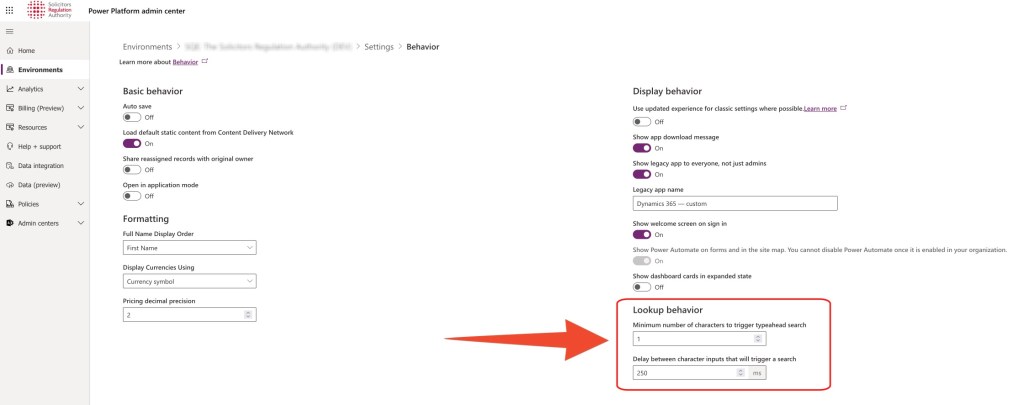
Lookup – search behaviour

Taken from: https://crmtipoftheday.com/1438/turn-on-auto-search-for-lookups/

Update these settings as per the screenshot to improve the search experience for users:
Share this:

  • Share on X (Opens in new window) X
  • Share on Facebook (Opens in new window) Facebook
Like Loading...

Related

Unknown's avatarAuthor Stelk ConsultingPosted on Apr 15, 2023Apr 15, 2023Categories Dynamics CRMTags Customization, Dynamics CRM, Environment settings, Microsoft Dynamics CE

Leave a comment Cancel reply

Post navigation

Previous Previous post: Checklist: setting up a new table in Dynamics CRM
Next Next post: How to set a Dataverse lookup with Power Automate

Also, check out our YouTube channel.

  • Dynamics CRM
  • Side Hustle

apple Audio Audio Recording Customisation Customization Davinci Resolve Dynamics CRM Environment settings In-app Notifications mac Microsoft Dynamics CE Power Automate Seiren Mini Side Hustle SLA YouTube

  • How to create in-app Notifications in Model-driven apps (MDAs) using Power Automate
  • How to construct a Dataverse record’s dynamic URL with Power Automate
  • How to set a Dataverse lookup with Power Automate
  • Dynamics 365 – useful settings
  • Checklist: setting up a new table in Dynamics CRM
Log in
  • Projects
  • Blog
    • Dynamics – Blog
    • My Journey – Blog
  • Contact
  • About
  • YouTube
The Dynamic Identity Website Powered by WordPress.com.
  • Comment
  • Reblog
  • Subscribe Subscribed
    • The Dynamic Identity
    • Already have a WordPress.com account? Log in now.
    • The Dynamic Identity
    • Subscribe Subscribed
    • Sign up
    • Log in
    • Copy shortlink
    • Report this content
    • View post in Reader
    • Manage subscriptions
    • Collapse this bar
 

Loading Comments...
 

    %d